tarumt-calendar-sync
LINK:
📅 Auto-Updating TARUMT Timetable Generator


Automatically sync your TARUMT class schedule to any calendar app with daily auto-updates!
| English | 简体中文 |
This tool generates your TARUMT timetable as a subscribable .ics file that automatically updates daily. Once set up, your calendar apps (iPhone, Google Calendar, Outlook, etc.) will always show your latest class schedule.
✨ Features:
- 🔄 Auto-updates daily at 6:00 AM Malaysia Time
- � Combines class schedule AND exam timetable in one file
- �📱 Works with all major calendar apps
- 🚀 Fork and set up in 5 minutes
- 🔒 Secure credential storage with GitHub Secrets
- 🆓 100% free and open source
🚀 Quick Start Guide
Step 1: Fork This Repository
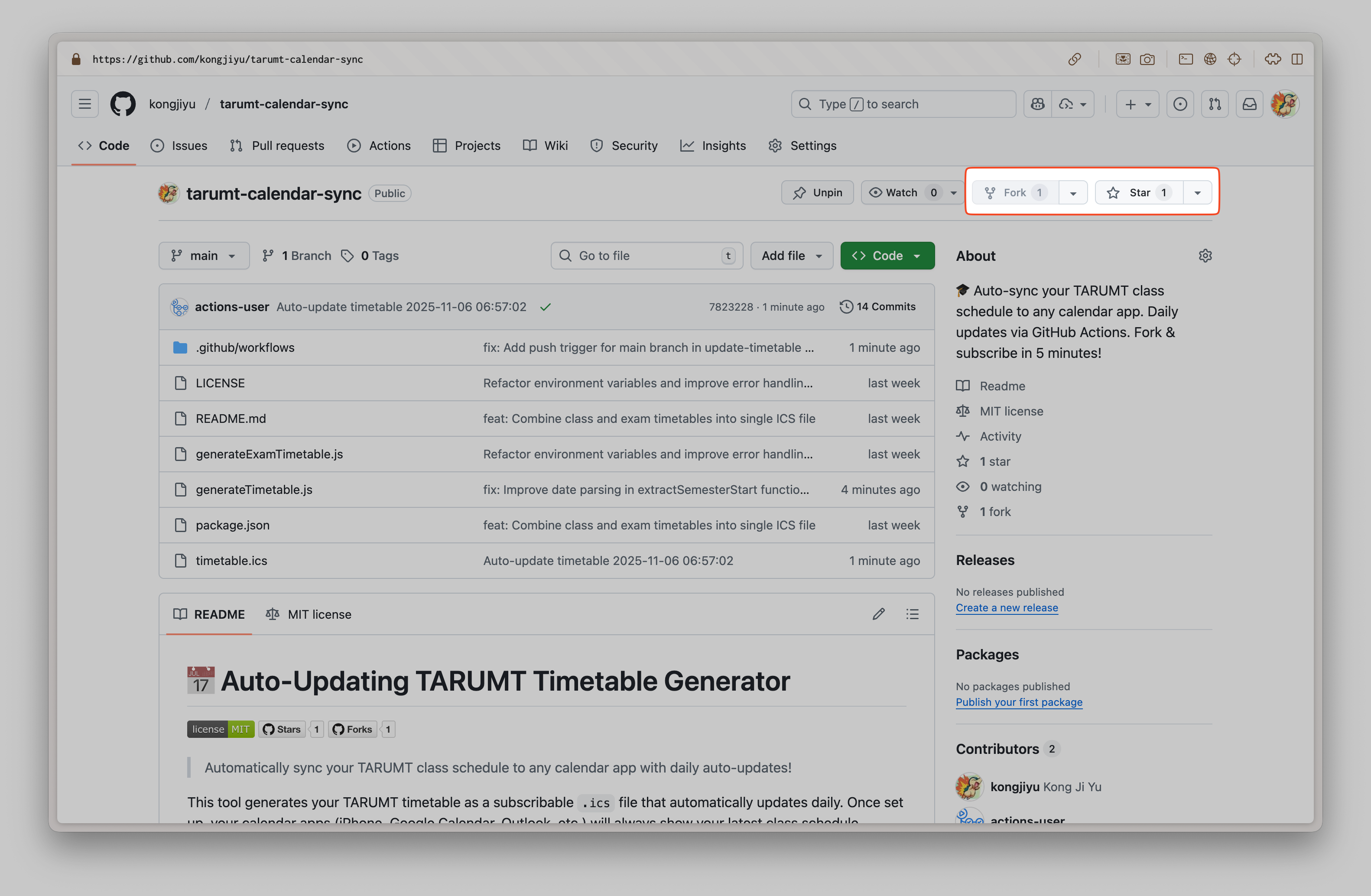
- Click the Fork and Star (if you like this repo) button at the top right of this page
-
This creates your own copy of the repository
Step 2: Configure GitHub Secrets
Your TARUMT credentials need to be stored securely in GitHub:
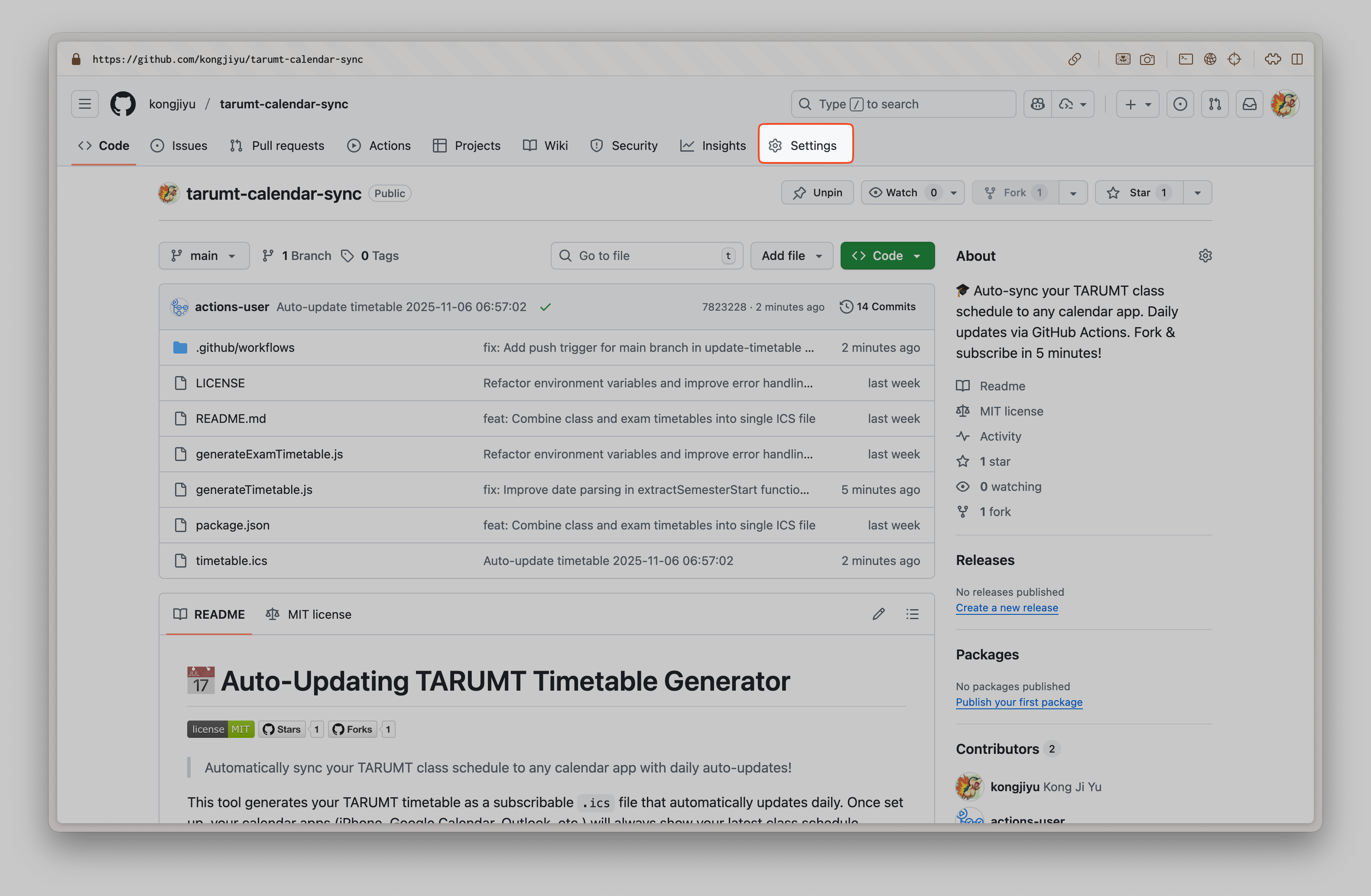
- Go to your forked repository on GitHub
- Click Settings → Secrets and variables → Actions
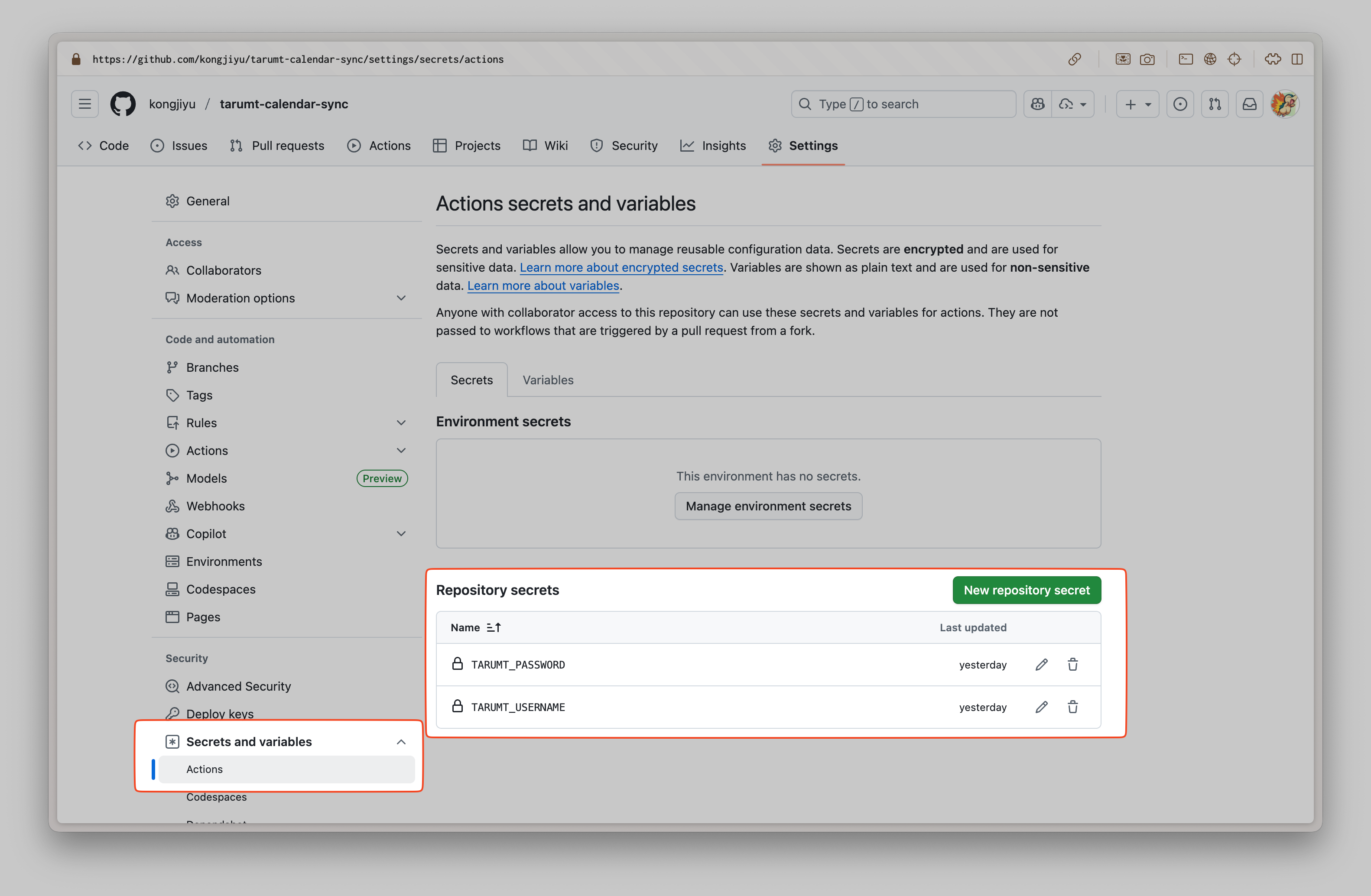
- Click New repository secret
-
Add the following two secrets:
Secret Name Value TARUMT_USERNAMEYour TARUMT student ID (e.g : 2500001) TARUMT_PASSWORDYour TARUMT portal password (e.g : password) How to add a secret:
- Click “New repository secret”
- Name:
TARUMT_USERNAME - Secret: Your actual TARUMT username
- Click “Add secret”
- Repeat for
TARUMT_PASSWORD
⚠️ Security Note: Your credentials are encrypted and never exposed. They’re only used by GitHub Actions to fetch your timetable.
Step 3: Enable GitHub Pages
This makes your timetable file publicly accessible for calendar subscriptions:
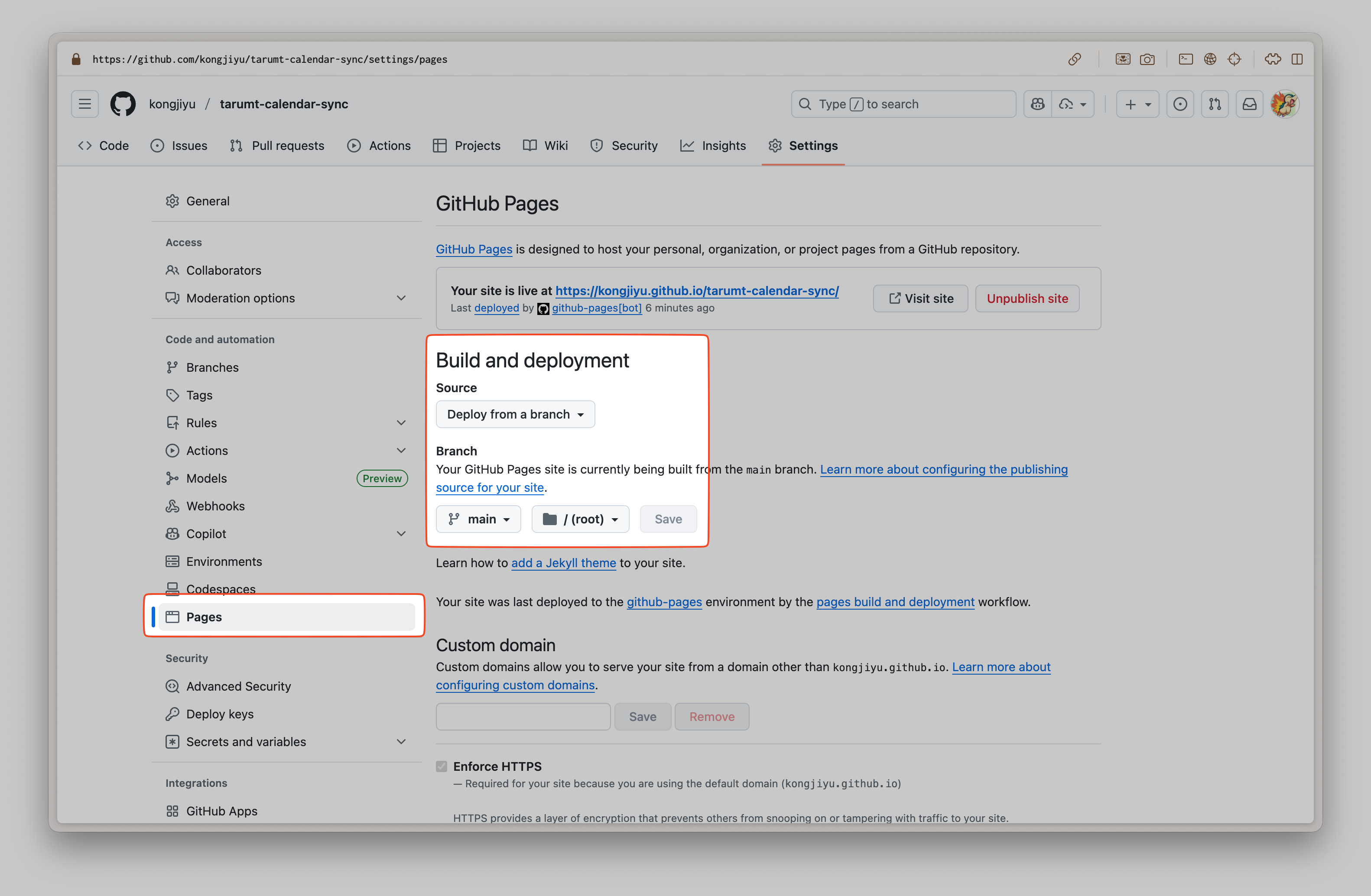
- In your repository, go to Settings → Pages
- Under Source, select:
- Deploy from a branch
- Branch:
main - Folder:
/ (root)
- Click Save
- Wait ~1 minute for deployment
Step 4: Get Your Subscription URL
After GitHub Pages is enabled, your calendar subscription URL will be:
https://YOUR_GITHUB_USERNAME.github.io/tarumt-calendar-sync/timetable.ics
Example:
If your GitHub username is johnsmith, the URL would be:
https://johnsmith.github.io/tarumt-calendar-sync/timetable.ics
Step 5: Test the Workflow
Before subscribing, let’s make sure everything works:
- Go to the Actions tab in your repository
- Click on Update Timetable Daily workflow
- Click Run workflow → Run workflow
- Wait for it to complete (green checkmark ✅)
-
Check that
timetable.icsfile appears in your repository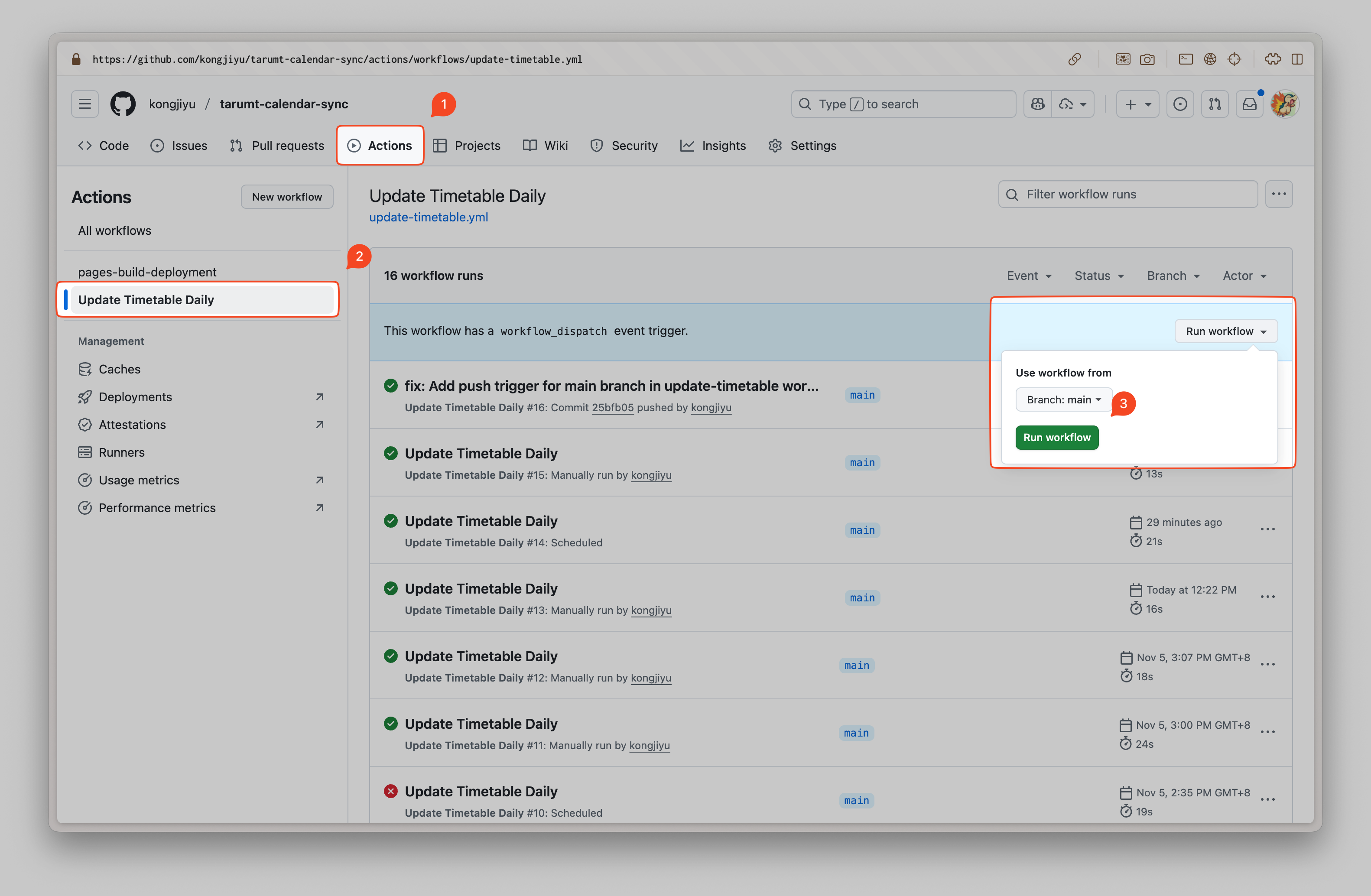
📱 Subscribe to Your Timetable
Once the workflow runs successfully, subscribe in your calendar app:
Apple Calendar (iPhone/Mac)
iPhone/iPad:
- Open Settings → Calendar → Accounts
- Tap Add Account → Other → Add Subscribed Calendar
- Paste your subscription URL
- Tap Next → Save
Mac:
- Open Calendar app
- File → New Calendar Subscription
- Paste your subscription URL
- Click Subscribe
- Set auto-refresh to Every hour
Google Calendar
- Open Google Calendar
- On the left sidebar, click the + next to “Other calendars”
- Select From URL
- Paste your subscription URL
- Click Add calendar
Note: Google Calendar may take up to 24 hours to sync
Microsoft Outlook
Outlook Desktop:
- File → Account Settings → Account Settings
- Internet Calendars tab → New
- Paste your subscription URL → Add
- Give it a name and click OK
Outlook.com:
- Click Add calendar → Subscribe from web
- Paste your subscription URL
- Name your calendar and click Import
⚙️ How It Works
Automatic Updates
The GitHub Action workflow runs automatically:
- Daily at 6:00 AM (Malaysia Time)
- Fetches your latest class timetable from TARUMT portal
- Fetches your exam schedule (if available)
- Combines both into a single
.icsfile - Publishes it via GitHub Pages
Your calendar apps will automatically refresh and show the latest schedule including exams!
Manual Updates
You can also trigger an update manually:
- Go to Actions tab
- Select Update Timetable Daily
- Click Run workflow → Run workflow
🛠️ Local Development (Optional)
If you want to test or generate the timetable locally:
Setup
-
Clone your forked repository:
git clone https://github.com/YOUR_USERNAME/tarumt-calendar-sync.git cd tarumt-calendar-sync -
Install dependencies:
npm install -
Create a
.envfile in the project root:TARUMT_USERNAME=your_student_id TARUMT_PASSWORD=your_password
Commands
# Generate combined timetable (classes + exams)
npm run generate

# Legacy: Generate exam timetable only
npm run generate-exam
The generated .ics files will open automatically on macOS.
Note: The main
timetable.icsfile now includes BOTH classes and exams, so you typically only need to subscribe to one calendar!
📂 Generated Files
| File | Description |
|---|---|
timetable.ics |
Main file - Combined class schedule AND exam timetable (subscribe to this!) |
exam_timetable.ics |
Legacy exam-only file (generated separately if you runnpm run generate-exam) |
🔧 Troubleshooting
Workflow fails in GitHub Actions
Check credentials:
- Go to Settings → Secrets and variables → Actions
- Verify
TARUMT_USERNAMEandTARUMT_PASSWORDare set correctly - Re-add them if needed
No timetable data:
- This is normal if the semester hasn’t started yet or exams aren’t scheduled
- The workflow will complete successfully and generate what’s available
- Classes will appear once the semester starts
- Exams will appear once they’re scheduled in the system
Calendar not updating
Apple Calendar:
- Right-click the calendar → Refresh
- Check subscription settings (should be set to “Every day”)
Google Calendar:
- Google refreshes subscribed calendars every 24 hours
- Be patient or remove and re-add the subscription
Outlook:
- Right-click the calendar → Update
Can’t access subscription URL
Check GitHub Pages:
- Settings → Pages → Make sure it’s enabled and deployed
- The URL should be:
https://YOUR_USERNAME.github.io/tarumt-calendar-sync/timetable.ics
Repository must be public:
- Private repositories need GitHub Pro for Pages
- Make sure your repository is set to Public in Settings
💡 Tips & Best Practices
- Keep your repository public - Required for free GitHub Pages
- Don’t share your credentials - They’re encrypted in GitHub Secrets
- Check Actions tab periodically - Ensure daily updates are working
- Refresh calendar apps manually - If you need immediate updates after a manual workflow run
- Fork, don’t clone - Forking makes it easier to get updates from the original repository
🤝 Sharing with Classmates
Your classmates can fork this repository and follow the same steps to create their own auto-updating timetable!
Or, if you want to share your timetable with others:
https://YOUR_USERNAME.github.io/tarumt-calendar-sync/timetable.ics
They can subscribe to this URL to see your schedule (useful for group projects or study sessions).
🔒 Privacy & Security
- Credentials are encrypted - GitHub Secrets are encrypted and never exposed
- Timetable is public - The
.icsfile is publicly accessible via GitHub Pages - No sensitive data - Only class schedules are shared, not grades or personal info
- You control access - You can make the repository private anytime (requires GitHub Pro for Pages)
📜 License
This project is licensed under the MIT License - see the LICENSE file for details.
What this means:
- ✅ Free to use, modify, and distribute
- ✅ Can be used for commercial purposes
- ✅ No warranty provided
- ⚠️ Must include the original license and copyright notice
🆘 Need Help?
- Check the Troubleshooting section above
- Review your GitHub Actions logs in the Actions tab
- Ensure your TARUMT credentials are correct
- Verify GitHub Pages is enabled and deployed
Made with ❤️ for TARUMT students